



Get the honest bit out of the way first: Claude doesn’t crawl your site. It has no way to go out and find your 404s, your duplicate titles, or your thin pages on its own. What it’s genuinely good at is triage, taking a raw export full of hundreds of rows and turning it into a short, prioritised “fix these first” list, which is usually the part that eats the most time in a manual audit.
This page covers the general, holistic version of that workflow: content gaps, on-page basics, link issues, the kind of audit you’d hand a client as a starting point for a wider conversation. If you want the narrower technical version, crawl errors, indexation, canonicalisation, and schema specifically, that’s covered separately, linked further down.
What to hand Claude before you start
You need an export from somewhere first, Claude does the thinking once the data’s in front of it, not the finding. Three realistic starting points, depending on what’s already in your stack:
- A Screaming Frog crawl export, for on-page and structural issues: titles, meta descriptions, headings, thin content, broken links.
- A Semrush Site Audit export, for a pre-scored issue list across a similar range of checks, useful if you already run Semrush regularly.
- A Google Search Console performance export, for the demand side: which pages and queries are gaining or losing clicks and position.
If none of these are connected yet, that’s a separate step, covered in full in our guide on connecting Claude to your SEO stack , either through a live MCP connection or a straightforward export-and-upload. This page picks up from the point where you’ve already got the data in hand.
A couple of things worth sorting before the first prompt goes in, not after. Export to CSV where the tool allows it, all three sources above support it natively, and it’s the format Claude parses most reliably row by row, a PDF report works in a pinch, but tables inside PDFs sometimes get mangled on the way through. And trim the file down to the columns that actually matter, issue type, URL, affected metric, rather than handing over every column the crawler spat out. A smaller, cleaner file gets a sharper Step 1 summary than a bloated one Claude has to wade through first.
One more thing worth a minute’s attention on a live client site: strip anything that doesn’t need to be there before it goes anywhere near an upload box, internal notes, email addresses, anything confidential beyond the SEO data itself. None of that’s needed for the triage below, only the issue and URL data actually earns its place.
The prompt sequence
Don’t throw the whole export at Claude with a single “audit this” prompt and expect a usable answer back. A sequence works better, each step building on the last. Here’s a worked run-through using a small, generic dummy export, a fictional coffee shop review site, nothing tied to a real client, so the actual prompts and outputs below are real, not hypothetical.
Step 1: Get Claude to summarise what’s actually in the export.
“Here’s a Screaming Frog export from [site]. Before we do anything else, summarise what’s in it: how many rows, what issue types are present, and roughly how many pages each issue affects.”
On our dummy export (62 pages crawled), Claude came back with: 15 pages with duplicate title tags, 40 pages missing a meta description, 5 blog posts under 300 words, 12 broken internal links, 6 image-heavy pages flagged for load speed, 3 straight 404s, and 2 pages that looked like they were competing for the same “best coffee shop Marina Dubai” query.
| Issue type | Pages affected |
|---|---|
| Duplicate title tags | 15 |
| Missing meta description | 40 |
| Thin content (under 300 words) | 5 |
| Broken internal links | 12 |
| Slow-loading, image-heavy pages | 6 |
| 404s | 3 |
| Cannibalising page pair | 2 |
Step 2: Group by type and estimate rough severity.
“Group these into categories and give each category a rough severity rating, high, medium, or low, based on likely SEO impact, not just row count.”
Claude grouped the 404s and the cannibalising pair as high severity, the duplicate titles and thin content as medium, and the missing meta descriptions and broken internal links as lower, on the reasoning that missing meta descriptions get auto-generated by Google anyway and broken internal links are a smaller drag than a page returning nothing at all.
Step 3: Weigh severity against real performance data.
“Here’s a Search Console export for the same site. Cross-reference it against the issue list, does severity change once you factor in which pages actually get traffic?”
This is the step that actually changes the order. One of the “medium” duplicate-title pages turned out to be a top-3-clicks page, which pushed it up the list, while two of the “high” 404s turned out to be old, zero-traffic pages nobody was linking to any more, which pushed them down.
Step 4: Ask for the final prioritised list, one line of reasoning per item.
“Give me the final prioritised fix list, ranked, with one line explaining why each item’s in that position.”
What came back:
| Rank | Issue | Why here |
|---|---|---|
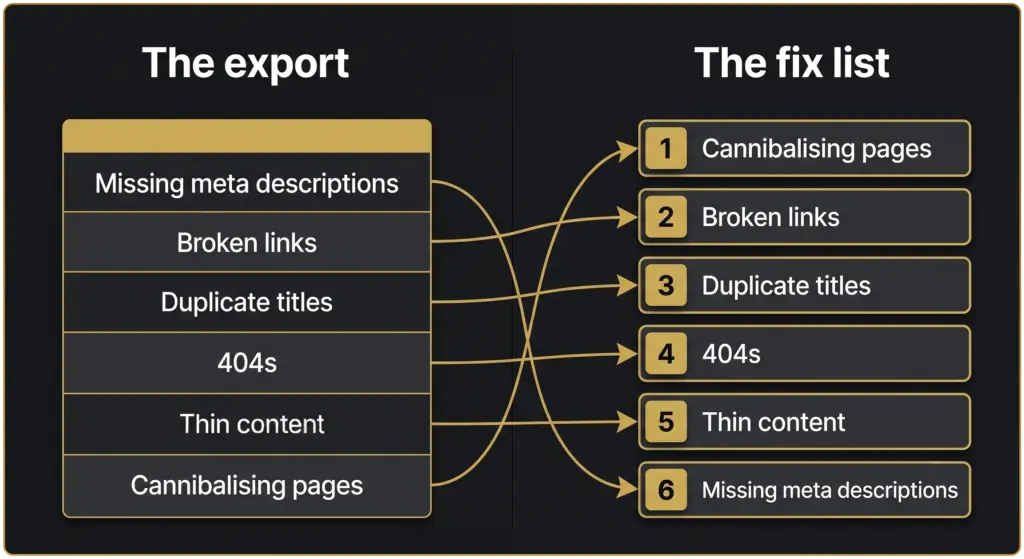
| 1 | Cannibalising page pair | Actively splitting real ranking signal on a page that already gets clicks |
| 2 | High-traffic duplicate title | One of the affected pages sits in the top 3 for clicks, worth fixing before anything lower-traffic |
| 3 | 404s carrying backlinks | Real, recoverable authority currently pointing at a dead page |
| 4 | Thin content | Genuine gap, but lower urgency than pages actively losing clicks right now |
| 5+ | Remaining duplicate titles, meta descriptions, broken links | Worth batching together in one pass rather than fixing one at a time |
Notice what moved: the plain row count from Step 1 said 40 missing meta descriptions was the biggest single issue, but it’s nowhere near the top of the final list. Row count and priority aren’t the same thing, and that gap is exactly what Step 3’s real performance data is for.
Where this stops and a human has to take over
Claude’s prioritisation is only as good as the data and context it’s handed. It doesn’t know which client relationship is sensitive, which fixes are already scheduled for next sprint, or which “issue” is actually intentional, a thin page that’s deliberately short because it’s a hub linking to longer ones, say. Read the output as a strong first pass, not a list ready to hand to a client unreviewed.
Take the cannibalising pair from the worked example above. Claude can flag that two pages compete for the same query and rank the fix as urgent, but it can’t decide which of the two pages should survive, merge, or redirect, that call needs someone who knows whether one of them serves a genuinely different audience, or carries a legacy backlink profile worth protecting. The judgment call on what’s worth the hours, and which page actually wins, still sits with a person who knows the account.
Same goes for the batch of missing meta descriptions further down the list. Claude will happily draft replacements for all 40 in one go, but it’s working from the page content alone, it doesn’t know the client’s about to run a seasonal promotion next month that should shape how five of those pages get described, or that three of them are slated for a redesign in the next sprint and aren’t worth touching yet. Batching the easy fixes is a genuine time-saver, running the batch without a quick human scan first is how a promo-relevant page ends up with a meta description nobody meant to publish.
Going narrower: the technical audit
Everything above is the general, holistic pass. If what you actually need is the technical side specifically, crawl errors, indexation, canonicalization conflicts, and schema gaps, read our dedicated technical SEO audit guide , which goes deeper on that narrower scope using the same kind of Screaming Frog export referenced here.
Frequently asked questions
Can Claude crawl my website directly?
No, not on its own. It needs an export or a live connection through something like MCP, covered in our guide on connecting Claude to your SEO stack. Hand it the data and it does the thinking, the finding still comes from a real crawler or tool first.
What file format works best for the export?
CSV, if the tool supports it. Screaming Frog, Semrush, and Search Console all export to CSV natively, and it’s the format Claude parses most reliably row by row. A PDF report works in a pinch, but tables inside PDFs sometimes get mangled on the way through.
How big a file can I hand it in one go?
There’s a practical limit depending on the platform at the time, and for anything past a few thousand rows, trim the file down to the columns that actually matter first, issue type, URL, affected metric, rather than handing over every column the crawler exported. A smaller, cleaner file gets a sharper Step 1 summary.
Does this replace a tool like Semrush Site Audit or Ahrefs?
No. Those tools still find the issues in the first place, this workflow is what happens after, turning whatever they find into a prioritised, plain-English list. It sits on top of the tool already in use, not instead of it.
Is it safe to run this on a live client’s real export?
Strip anything that doesn’t need to be there before it goes anywhere near an upload, internal notes, email addresses, anything client-confidential beyond the SEO data itself. None of that’s needed for the triage, only the issue and URL data actually earns its place.
How often should this get re-run?
Whenever there’s a fresh crawl or GSC export worth acting on. Most teams doing this well run it on roughly the same cadence as their existing audit schedule, monthly or quarterly, rather than as a one-off.
Where this fits
This workflow gets you a prioritised list. It doesn’t fix anything on the site by itself, and it doesn’t replace the judgment call on which fixes are worth the hours across every client on the books. If you want that run properly, and kept current as the site changes, that’s what our SEO service is for.
Not ready for that conversation yet? Run your site through the free SEO & AI Visibility Audit first and see where you actually stand.
Sources cited
- Semrush Keyword Analytics: Claude SEO audit, AI SEO audit tool, US database, pulled 2026-07-30.