


This is the narrow version. Our general SEO audit guide covers content gaps, on-page basics, and link issues, the kind of audit you’d hand a client as a starting point. This one’s technical only: crawl errors, indexation, canonicalisation, schema gaps, the stuff that needs someone who already knows what those terms mean and wants the priority list, not the explanation.
Worth stating upfront, since it changes how this page is written: Screaming Frog now supports Claude natively. Their own product page lists “AI Integration” as a built-in feature, custom AI prompts with OpenAI, Gemini, Ollama, and Anthropic, run directly while a crawl’s happening. So there are genuinely two routes in here, not one, and this page covers both honestly rather than assuming export-and-upload is the only option.
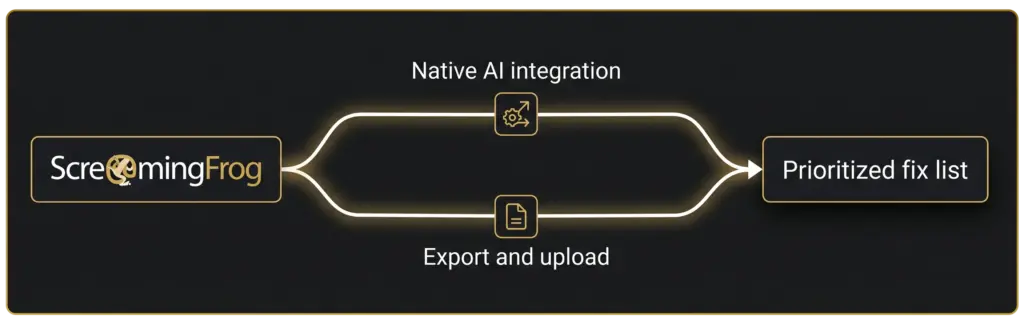
Two real routes in: native AI integration and manual export
Screaming Frog’s own documentation confirms Claude’s a supported provider inside their AI Integration feature, set it up once in the SEO Spider’s settings and it’ll run custom AI prompts against pages as they’re crawled, no separate export step needed. Worth knowing this exists. Worth also knowing that Screaming Frog’s own tutorial library currently covers “how to crawl with ChatGPT” specifically, nothing Claude-specific yet, despite Claude being right there in the settings. That gap is exactly why this page exists.
Full setup for either route, the native integration or a live MCP connection, is covered in proper depth in our guide on connecting Claude to your SEO stack, this page won’t repeat that here. What follows assumes you’ve either got the native integration running or you’ve exported a crawl and you’re ready to hand it to Claude directly.
What to export for a technical-only pass
Narrower than a general audit export. For a purely technical triage, the fields that actually matter:
- Response codes and indexability status, for finding real errors, not just noting a page exists.
- Canonical link element and canonical HTTP header, checked against each other, not just present or absent, since a page can have both and have them disagree.
- Redirect chains and loops, not just individual redirects in isolation.
- hreflang attributes, if the site serves more than one language or region.
- Structured data validation results, flagged against schema.org requirements, not just “present or missing.”
Pulling only these columns, rather than the full crawl export with every field Screaming Frog collects, keeps the file smaller and keeps Claude’s first pass focused on what this specific audit is for.
The prompt sequence for a technical triage
Same shape as the general audit workflow, summarise, group, cross-reference against real performance, then prioritise, just scoped technical throughout. Worked example below uses the same dummy site convention as the rest of this cluster, a fictional coffee shop review site, nothing tied to a real client.
Step 1: Summarise the technical export.
“Here’s a Screaming Frog export, technical fields only. Summarise what’s in it: response codes, canonical conflicts, redirect chains, and any structured data errors.”
On our dummy export, Claude came back with: 2 pages returning a 404, 1 redirect chain running three hops deep, 3 pages where the canonical HTTP header and the canonical link element point to different URLs, and 1 page with an invalid LocalBusiness schema missing a required field.
| Technical issue | Pages affected |
|---|---|
| 404s | 2 |
| Redirect chain (3 hops) | 1 |
| Conflicting canonical signals | 3 |
| Invalid structured data | 1 |
Step 2: Group by severity.
“Rate each category’s likely SEO impact, high, medium, or low, and explain the reasoning.”
Claude rated the conflicting canonicals high, on the reasoning that a page telling Google two different things about which URL is the “real” one risks the wrong version getting indexed, or worse, both competing against each other. The redirect chain and the invalid schema came back medium, the 404s lower, since neither affected page showed any inbound links in the crawl.
Step 3: Cross-reference against real performance.
“Here’s a Search Console export for the same pages. Does the priority order change once you factor in which ones actually get clicks?”
One of the three canonical conflicts turned out to be on the site’s best-performing page, “best coffee shop Marina Dubai,” a page that currently sends its canonical header to a URL with a trailing slash while the on-page canonical tag points to the version without one. That inconsistency pushed straight to the top of the list, the other two conflicts sat on pages with negligible traffic and dropped down accordingly.
Step 4: Final prioritized list.
“Give me the ranked fix list, one line of reasoning per item.”
| Rank | Issue | Why here |
|---|---|---|
| 1 | Canonical conflict on the top-traffic page | Header and tag disagree on a page that’s actually earning clicks, real risk of split signal on the site’s best asset |
| 2 | Invalid structured data | Missing required schema field, an easy, contained fix worth clearing before it affects rich-result eligibility |
| 3 | Redirect chain | Three hops is enough to slow crawl efficiency, worth flattening to one hop |
| 4 | Remaining canonical conflicts | Same fix pattern as item 1, lower urgency given negligible traffic |
| 5 | 404s | No inbound links found in this crawl, worth a batch fix, not an urgent one |
Where this page stops, and SP4 or SP7 pick up
If the crawl or the Claude connection itself isn’t set up yet, whether that’s the native AI Integration feature or an MCP connection, that’s covered properly in our stack-connection guide, not repeated here. And if the technical scope here is narrower than what’s actually needed, missing content, on-page basics, link issues alongside the technical picture, the general audit workflow covers that broader ground. This page stays narrow on purpose: technical export in, prioritised technical fix list out.
Frequently asked questions About Technical SEO Audit with Claude
Does Claude replace Screaming Frog?
No. Screaming Frog still does the crawling, whichever route gets used. Claude’s job is turning what Screaming Frog finds into a prioritised, plain-English list, not finding the issues in the first place.
Can I use Screaming Frog’s built-in AI Integration instead of exporting manually?
Yes, it’s a real, documented feature, and Claude’s one of the supported providers alongside OpenAI, Gemini, and Ollama. Full setup for it sits in our stack-connection guide rather than here, this page assumes either route’s already running.
Is there a Claude-specific tutorial from Screaming Frog itself?
Not yet, as of this writing. Their own tutorial library covers crawling with ChatGPT specifically, Claude’s supported in the settings but doesn’t have its own dedicated walkthrough from Screaming Frog. That’s the gap this page is written to fill.
What technical issues should I trim the export down to?
Response codes and indexability, canonical link element and header together, redirect chains, hreflang if relevant, and structured data validation results. Leave out fields that matter more for a general content audit, they’ll just add noise to a technical-only pass.
Can Claude detect JavaScript rendering problems on its own?
No, not without the crawl data in front of it. Screaming Frog’s rendering mode is what actually renders the page and flags what’s missing, Claude’s job starts once that’s already in the export.
How is this different from the general SEO audit workflow?
Scope. The general workflow covers content gaps, on-page basics, and link issues together, a broader starting point for a wider conversation. This one’s technical only, crawl errors, indexation, canonicalisation, and schema, for a reader who already knows those terms and wants the priority list.
Where this fits
Finding and ranking a canonicalisation conflict is one thing. Fixing it consistently across a CMS at scale, and catching the next one before it costs rankings, is a different job. If you’d rather have that run properly, that’s what our Technical SEO service is for.
Not ready for that conversation yet? Run your site through the free SEO & AI Visibility Audit first and see where you actually stand.
Sources cited
- Semrush Keyword Analytics: Claude technical SEO audit, screaming frog AI, screaming frog Claude, US and AE databases, pulled 2026-07-30.
- Screaming Frog SEO Spider product page, confirming Anthropic/Claude as a supported provider in their AI Integration feature, checked 2026-07-30.